
Yes, artificial intelligence is truly capable of reading sheet music and performing the music from it
When people ask this question, they usually imagine one of two scenarios. Either they have sheet music on paper or in PDF format and want to hear how the music sounds; or they have a recording of a performance and want to obtain the written sheet music. On the surface, these tasks seem identical, but "under the hood," they rely on completely different artificial intelligence systems.
A pianist who wants to hear an unfamiliar score before learning it needs a tool for playing back sheet music that converts visual notation into sound. A guitarist trying to transcribe a solo from a recording needs something else—a system capable of "listening" to audio and recording what it hears as sheet music. In both cases, artificial intelligence is involved, and the result is either sheet music or audio playback, but the underlying technologies are fundamentally different.
What people really mean when they ask this question
When people ask this question, they usually imagine one of two scenarios. Either they have sheet music on paper or in PDF format and want to hear how the music sounds; or they have a recording of a performance and want to obtain the written sheet music. On the surface, these tasks seem identical, but "under the hood," they rely on completely different artificial intelligence systems.
A pianist who wants to hear an unfamiliar score before learning it needs a tool for playing back sheet music that converts visual notation into sound. A guitarist trying to transcribe a solo from a recording needs something else—a system capable of "listening" to audio and recording what it hears as sheet music. In both cases, artificial intelligence is involved, and the result is either sheet music or audio playback, but the underlying technologies are fundamentally different.
Two technologies that sound similar but are not
Optical Music Recognition (OMR) technology reads images of musical scores and converts them into digital musical data. Audio transcription involves analyzing audio recordings to determine pitch, rhythm, and instruments used. These are separate areas within artificial intelligence, differing in their strengths, accuracy levels, and tool ecosystems.
OMR (Optical Music Recognition) technology, which underpins AI tools for working with musical scores, acts like a specialized scanner. It recognizes staves, note heads, beams (note grouping), and clefs, and then analyzes their spatial arrangement to recreate the music in a digital format suitable for playback. Tools using this approach (such as Soundslice and Maestria) are specifically designed to read sheet music from images.
Audio transcription—a process also known as Automatic Music Transcription (AMT)—follows the opposite path. Programs like Klangio AI and AnthemScore analyze an audio recording and attempt to determine which notes are sounding, with what intensity (dynamics), and for what duration. Essentially, they perform the reverse task: converting a performance back into sheet music.
Both technologies produce similar results—typically MIDI or MusicXML files that can be played back or edited. However, confusion between them often leads to disappointment. If you have a PDF file, you need a tool for recognizing sheet music from images. If you have an MP3 file, you need a program for audio transcription. Understanding exactly which task you are solving is the first step to achieving high-quality results.
It is the gap between developers' promises and the actual capabilities of tools that becomes the main cause of user dissatisfaction. Understanding the workflow—from scanning and obtaining structured data to playback—allows you to appreciate both the power and the limitations of modern AI technologies in music recognition.
Artificial Intelligence Technology for Recognizing Musical Scores
Recognizing text from a page is a task that artificial intelligence successfully handled many years ago. Scanning receipts, digitizing book chapters, converting handwritten letters into editable text—all these are already solved problems. So why does reading musical notation still present such a challenge? The answer lies in the fundamental difference in how information is encoded on the page: in one case, it is text; in the other, it is music.
Text develops linearly: letters form words, words form sentences, and meaning is read from left to right and top to bottom. Musical notation, on the contrary, encodes information in multiple dimensions simultaneously. A single vertical slice of a piano score may include notes for both hands, dynamic markings below the staff, tempo indications above it, slurs spanning several measures, and pedal markings at the bottom of the page—and all of this must be perceived as a whole. This is precisely what makes creating a reliable sheet music scanner such a complex technical challenge.
Three Generations of Music Reading Technologies
The development of artificial intelligence technologies in the field of optical music recognition has gone through three distinct stages, each representing a fundamentally different approach to solving the problem.
The first generation of systems relied on image processing methods based on rigid rules. These early systems employed heuristic filters and template-matching algorithms to detect staff lines, segment the image into separate regions, and recognize noteheads by their shape and position. Their operating principle can be described as a set of strict logical conditions: “if a filled oval is located on the third line of the staff (in treble clef), then it is the note 'B'.” Such systems handled clean and simple scores successfully but quickly failed when faced with visual complexity or differences in printing styles.
The second generation was marked by the introduction of machine learning methods; specialized tools such as ScanScore and the open-source program Audiveris are built on this technology. Instead of manually defined rules, these systems use trained neural networks: specifically, convolutional neural networks (CNNs) for recognizing graphical elements, and recurrent neural networks (RNNs) or transformers for modeling sequential relationships between symbols. Recent studies show that hybrid architectures—for example, convolutional recurrent neural networks (CRNNs)—can achieve accuracy comparable to human performance when processing monophonic and simple polyphonic scores, performing feature extraction, symbol classification, and sequence decoding simultaneously. Tools like piano notes and PlayScore use various variations of such trained models specifically for recognizing musical notation.
The third generation is the newest and most experimental: multimodal large language models (LLMs) such as GPT-4, Claude, and Gemini, which attempt to recognize musical notation within their general visual perception capabilities. These models were not specifically trained as melody recognition systems—they are general-purpose systems simply capable of processing images. As expected, the results are unstable.
Why Sheet Music Is Harder for AI to Process Than Plain Text
When it comes to optical character recognition (OCR) of text, the task seems relatively simple: each character occupies a separate space, the reading order is linear, and context helps resolve ambiguities. However, musical notation completely violates all these assumptions.
Here is exactly what makes reading sheet music such a difficult task for AI-based music systems.
- Polyphony and vertical voice overlapping: When multiple notes sound simultaneously, the system must process overlapping symbols located on the same staff line and aligned horizontally.
- Beaming and grouping: Notes are connected by beams that indicate rhythmic groups; the angle of these beams and their connection points carry semantic information.
- Articulations and dynamics: Dots, accents, staccato marks, hairpins (curved lines), and textual markings are distributed along the length of the staff—their placement may vary depending on the publisher and the specific edition of the sheet music.
- Spatial relationships: A change in the vertical position of a single pixel determines which note is indicated. The difference between notes G and A is just one position on the musical staff—merely a slight spatial difference that has enormous musical significance.
- Layout variations: Different publishers use different spacing between symbols, font styles, and typographic rules, so a model trained on data from one style may struggle to process text in another style.
- Tied notes, mazurkas, and cross-staff notes: Curved lines connecting notes across measures or between musical parts require the system to account for long-term dependencies rather than simply processing symbols in isolation.
Research into end-to-end neural methods for piano notation, involving double staves and complex beam structures, has only recently enabled reliable transcription of full piano scores without manual segmentation. Transformer-based sequence-to-sequence systems have further advanced this field by capturing long-term dependencies between musical symbols, yet performance remains at previous levels when generalizing to completely unfamiliar print styles.
How neural networks process visual notation
Imagine that you upload an image of a sheet music page into a trained melody scanning system. This system “reads” the notes differently than a musician does. Instead, it processes the image by passing it through layers of abstraction. In the initial stages, boundaries and basic shapes are recognized: lines, curves, filled ovals. Intermediate layers combine them into recognizable elements: note heads, stems, flags, clefs. In the final stages, these elements are assembled into a structured sequence reflecting pitch, rhythm, and expressive markings.
Specialized tools for optical music recognition (OMR), such as ScanScore, train neural networks on thousands of annotated images of scores, instilling in the model an understanding of the specific visual language of music. More modern approaches using the CTC (Connectionist Temporal Classification) method and sequence-to-sequence architectures reduce the need for careful alignment of images with annotations. This accelerates training and increases the system's versatility when working with various styles of musical notation graphics.
Universal large language models (LLMs) operate differently. A study conducted by a specialist at artfish.ai, showed that advanced models (Claude, GPT, Gemini) are often able to determine the title of a popular piece and correctly recognize the key and time signature, but consistently make mistakes when identifying individual notes. When asked “which note comes first?” in pieces they had just correctly identified, all three models gave incorrect answers. Musical notation presents a complex challenge for such models: it is a visual object, but its meaning lies in minute spatial relationships, which do not receive particular attention during the training of universal computer vision systems.
This gap between specialized OMR systems and general-purpose artificial intelligence explains why the choice of tool is crucial. A specialized sheet music scanner trained specifically on musical notation will always outperform a general-purpose chatbot in real-world digitization tasks. However, to understand what happens after recognition—how exactly the recognized symbols are turned into sounding music—it is necessary to trace the subsequent data transformations.
Full workflow — from scanning to sound
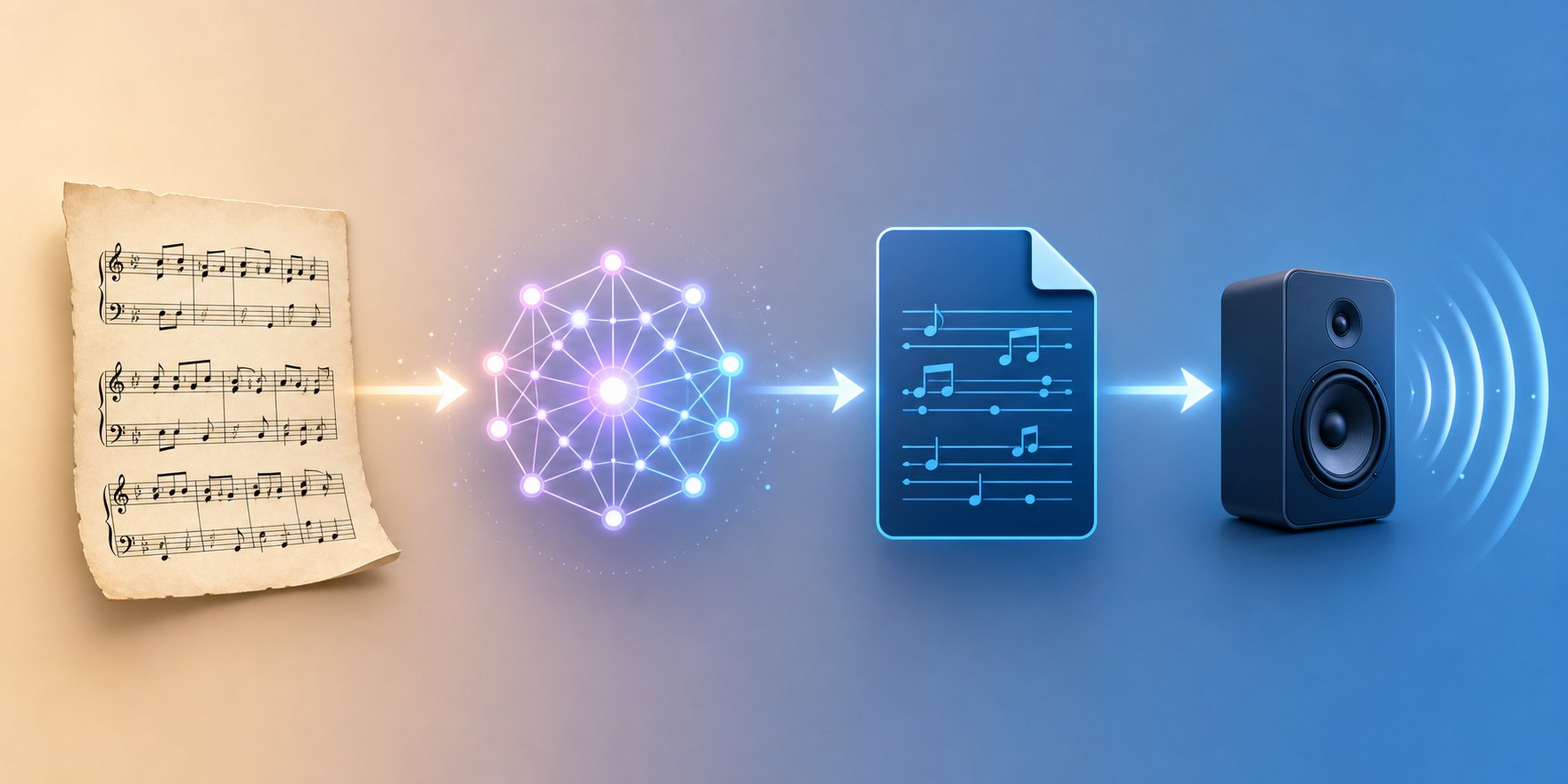
Here is what surprises most people: artificial intelligence cannot directly convert an image of a musical score into an audio recording. There is no single step that immediately turns an image into sound. In fact, the process goes through a chain of transformations, where at each stage the image of the music is converted into a format increasingly suitable for further processing. Understanding this chain of stages explains both the effectiveness of the technology itself and the reasons for errors occurring at various stages.
Think of it like translating a book from one language to another. You cannot simply look at a page of French text and immediately speak it in English. First, you read the words, grasp their meaning in an abstract form, and then convey that meaning in the new language. A similar principle underlies AI-based music notation recognition: visual symbols are interpreted as structured data, which is then reproduced as sound.
Step-by-step: from paper to playback
Whether you are working with scanned sheet music obtained from a flatbed scanner or with a PDF file downloaded from a digital library, the process of converting notes into a playable music file always follows the same algorithm.
- Upload or save the source material. This can be a photo taken with a mobile phone, a high-resolution scan file, or a PDF file. The quality of the source material directly affects all subsequent processing stages: blurry images or low-contrast scans lead to errors right from the start—even before the artificial intelligence system begins processing the data.
- AI recognition and symbol interpretation. The OMR engine analyzes the image, identifying staff lines, note heads, stems, beams, rests, key signatures, time signatures, dynamic markings, and articulations. It then determines the spatial position of each element to establish pitch and rhythmic duration. It is at this stage that the previously mentioned neural networks come into play, performing the main and most labor-intensive part of the work.
- Conversion to a structured intermediate format. The recognized musical symbols are encoded into a machine-readable file—usually in MIDI or MusicXML format. This is a key conversion stage: at this point, the AI does not generate an audio recording, but forms a structured description of the music that other software can interpret.
- Playback using a synthesizer or notation software. An online MIDI player, a digital audio workstation (DAW), or a notation editor (such as MuseScore) reads the intermediate file and plays it back as sound using synthesized instruments. It is at this stage that you finally hear the music.
Each stage in this chain is a potential weak link. A shadow on the scan may cause the AI to misrecognize a note in the second stage. In the third stage, an error in determining accidentals may result in the wrong pitch being recorded in the MIDI file. By the time you reach the fourth stage, you hear a wrong note, but you may not understand at which exact stage the error occurred. It is due to this cumulative effect that the quality of scanning and preparation of the source material plays such an important role: the “garbage in, garbage out” principle applies fully here.
Converting sheet music to MIDI format is the step that interests users the most, since it is MIDI that enables playback. Tools like PlayScore 2 handle this entire process within a single mobile app: you take a photo of the sheet music or import a PDF file, the app recognizes the image, and you can export the result as a MIDI file ready for playback or further editing. However, even in such a convenient and well-tuned app, the same four processing stages occur “under the hood.”
Why intermediate data formats like MIDI and MusicXML are so important
You might wonder why an intermediate format is needed in this process at all. Why not go directly from recognized sheet music to an audio file? The answer lies in flexibility. Different users need different capabilities when working with the same scanned sheet music: a student needs music playback, a composer needs to edit the notation, and a musicologist needs archival-quality encoding. It is the intermediate format that determines what can be done with the recognized music after the AI has finished its work.
Three formats dominate this market, each designed to address a specific task:
| Format | Purpose | Best For | Limitations |
|---|---|---|---|
| MIDI | Encodes musical note events (pitch, duration, velocity, and timing) as commands for controlling electronic musical instruments. | Playback, DAW integration, music sequencing, converting MIDI files to MP3 format using a synthesizer | Does not preserve notation details—such as stem direction, note grouping, dynamic markings, or layout formatting—it stores only information about which notes sound and when. |
| MusicXML | Encodes the full visual and semantic content of sheet music in a structured XML format. | Import into notation editors (MuseScore, Finale, Sibelius) while preserving all formatting and typographic details of the notation. | Larger file size; cannot be played back directly without specialized software for interpreting sheet music. |
| MEI (Music Encoding Initiative) | Academic-grade encoding that captures notation, metadata, editorial annotations, and source provenance | Musicological research, digital archives, critical editions of historical manuscripts | Complex to produce and consume, limited tool support outside academic contexts |
It is important to emphasize the difference between MIDI and MusicXML formats. MIDI describes how music sounds: which notes play, when they start, and their duration. MusicXML describes how music looks—the actual sheet music, including note grouping (beams), stem directions, expression markings, and page layout. As Michael Good, the creator of MusicXML, explained, this format is designed to convey musical information in a richer and more precise way than is possible with MIDI alone.
In practice, this means the following: if your goal is to listen to playback, change the tempo of a MIDI clip, or load it into a DAW (Digital Audio Workstation) for further processing, then the MIDI format is suitable for you. If, however, you want to open the score in a notation editor and edit it—correct wrong notes, rearrange parts, print a clean copy—then MusicXML will preserve much more information from the original score. The MEI format is aimed at a narrower audience, primarily researchers working with historical manuscripts who need to encode not only the music itself but also editorial decisions and relationships between different sources.
Most OMR (Optical Music Recognition) tools support export to both MIDI and MusicXML, allowing you to choose based on your subsequent tasks. Some programs, such as Audiveris, save files in MusicXML format by default, since it contains more information, and MusicXML can later be converted to MIDI using a notation editor. The reverse process—converting MIDI to MusicXML—results in data loss, because MIDI simply does not contain the notation details encoded in MusicXML.
This workflow architecture also explains an important practical point: the quality of the final sound depends not only on how accurately the AI recognized the score, but also on what happens during the sound synthesis (rendering) stage. Even a perfectly recognized MIDI file will sound mechanical if played back through a standard General MIDI synthesizer. The same file, routed to high-quality virtual instruments in a DAW, will sound completely different. The intermediate format is just a set of data; the question of how this data will be voiced is a completely different topic.
What Performance Actually Sounds Like
So, the AI has read your score and created a MIDI file. You press the play button. And what you hear sounds... mechanical. Every note plays with the same volume, with metronomic precision, and with a complete lack of expressiveness. This is the moment when most people become disappointed, because for a human, "performing" music means something quite different than it does for a computer.
The gap between what sheet music reading software outputs and the sound of a real performance is huge. Understanding the reasons for this difference—and knowing how to overcome it—turns the disappointing experience of listening to soulless sounds into something truly useful.
MIDI Playback vs. Realistic AI-Powered Performance
When most Optical Music Recognition (OMR) tools "play back" a scanned score, they send MIDI data to a synthesizer. The MIDI format itself is not sound, but a set of instructions: which note to play, when to start, with what force to strike the key, and when to release it. Think of it as a digital equivalent of a punch tape for a mechanical piano, rather than an audio recording. The sound quality depends entirely on which instrument interprets these commands.
A standard General MIDI synthesizer (built into most operating systems and web applications) maps these instructions to simple sampled sounds. The result can be instantly previewed via an online player, but the sound will be flat and lifeless: every note is played identically, without regard for musical context.
Realistic performance using artificial intelligence is a separate, much newer technology. Instead of simply extracting notes with fixed velocity, such systems interpret the score like a professional musician: they add subtle timing deviations (rubato), dynamic nuances, articulation differences, and instrument-specific playing techniques. Researchers from Queen Mary University of London presented RenderBox — a system that converts MIDI scores into expressive performances of various instruments using a diffusion transformer architecture. The system is trained on real recordings of live musicians, gradually moving from strict sound synthesis to stylistically diverse interpretations and even learning to reproduce the playing style of specific pianists.
Similarly, in the Expressive Music Variational AutoEncoder (XMVAE) model, the task is divided between two components: a "Composer" branch responsible for notes and structure, and a "Pianist" branch that generates expressiveness parameters—such as tempo (timing) variations, dynamics curves (velocity), and articulation. These models demonstrate that AI is capable of going beyond mechanical playback and moving toward truly musical performance, although this technology is currently primarily in the research stage and has not yet become standard in consumer applications for playing piano scores.
Making MIDI Output Sound More Musical
Until AI-powered MIDI processing becomes widely available, you have several practical options for improving the sound of scanned MIDI output. The difference in quality is significant:
| Playback Method | Quality Level | Availability | Best For |
|---|---|---|---|
| Raw General MIDI stream (for browser or OS synthesizers) | Low — mechanical, thin sound | Free online MIDI tool — works instantly and is accessible anywhere. | Quick recognition check: ensure recognition results are correct. |
| Score playback in specialized music software (MuseScore, Dorico) | Medium level — better samples, basic expression | Cost — from free to moderate; installation required. | Students studying music analysis (MuseScore), preparing for rehearsals. |
| DAW with virtual instruments | High-quality realistic sound instruments based on sample data with full control over sound parameters | Requires DAW software, virtual instrument libraries, and basic knowledge of music production. | Composers, arrangers, and producers creating professionally polished audio recordings |
| Rendering with AI visualization support (RenderBox, XMVAE-based systems) | Very high level — natural, human-like timing, dynamics, and style. | Currently available exclusively for demo research versions and specialized tools. | Realistic performance modeling and style exploration |
For most users, music notation software represents the optimal compromise. For example, MuseScore includes a built-in player with decent instrument sound quality and can interpret some dynamic and articulation markings when importing MusicXML files. NotePerformer, a third-party player for Sibelius and Dorico, uses AI-based algorithms to automatically add musical expressiveness to notes, offering a practical solution between raw MIDI playback and full professional-level performance rendering.
The DAW workflow provides maximum control over sound. Loading MIDI data into a digital audio workstation (DAW) and processing it using high-quality sample-based instruments—libraries in which every note of a real violin or piano has been recorded separately at various dynamic levels and articulations—allows you to achieve results that sound almost indistinguishable from a live recording. As virtual instrument developer Benjamin Botkin explains, modern sound tools with digital samples are capable of conveying an extremely large number of subtle sonic nuances, enabling experienced users to create convincing orchestral music exclusively based on MIDI data using a standard home computer.
The key understanding here is as follows: the task of artificial intelligence in recognizing sheet music ends at the stage of generating the MIDI file. All subsequent aspects—how musical, realistic, and expressive the playback sounds—depend entirely on your processing settings. Even with perfectly accurate recognition, quality arrangement is still required for the result to sound like music rather than a set of data. Moreover, recognition accuracy itself has real limits, which should be taken into account even before you start scanning your first sheet music score.
Limitations of Artificial Intelligence and Cases of Its Errors
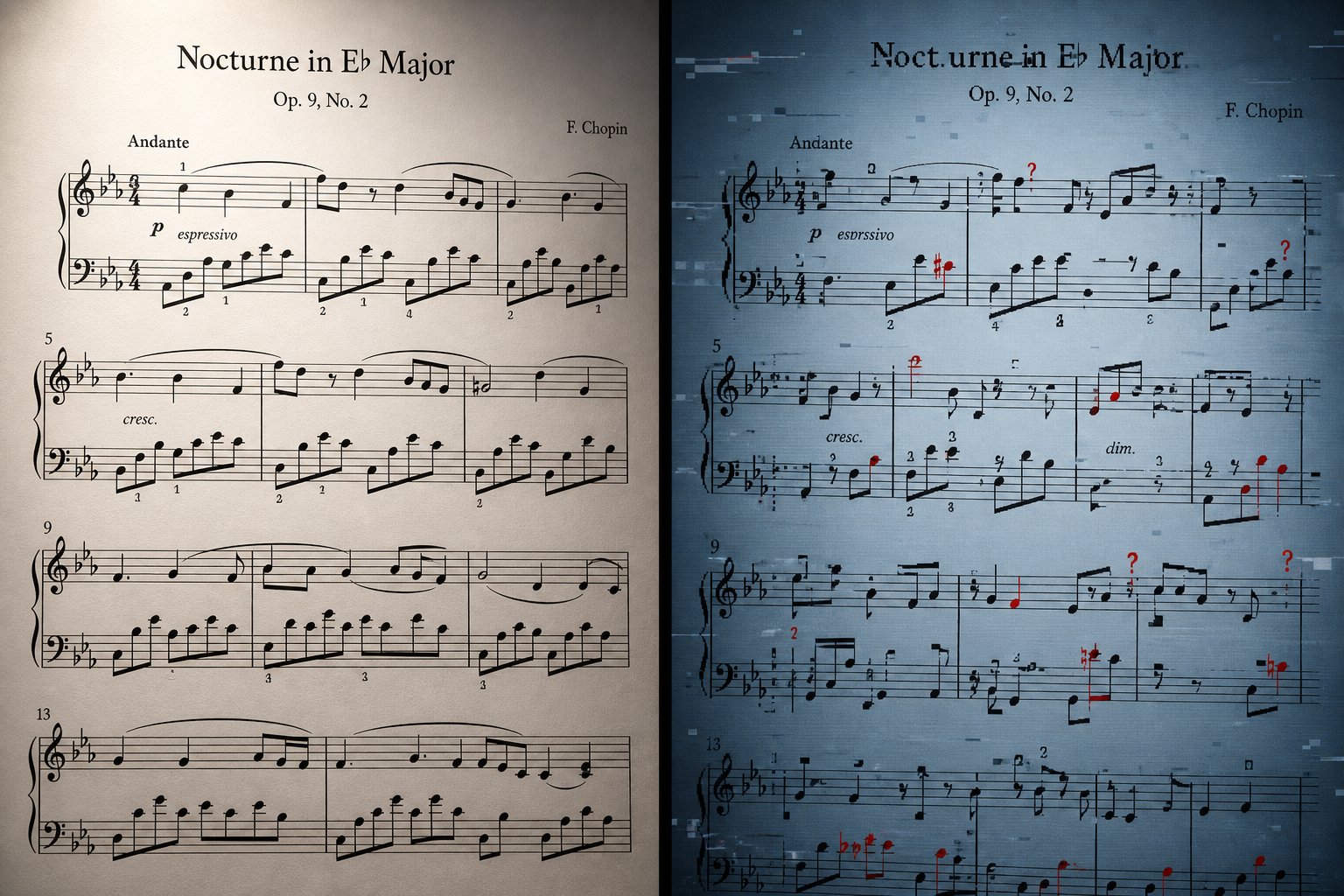
Accurate note recognition and clean sound reproduction create an impression of optimism. However, anyone who has ever processed sheet music using an Optical Music Recognition (OMR) tool knows that reality is much more complex. AI-based sheet music recognition systems perform impressively well under ideal conditions but quickly lose effectiveness with any deviations from the ideal. Knowing where the technology fails allows you to avoid wasting time correcting distorted data—those very results that were not worth scanning in the first place.
Where AI Falters in Reading Sheet Music
Not all sheet music parts are equally valuable for a recognition system. The complexity of written notation for piano, the density of notes on the staff, and the physical condition of the source material—all these directly determine whether AI will produce a correct result or merely an unusable set of data.
Here are the types of scores sorted by the degree of difficulty for accurate processing by artificial intelligence—from simplest to most complex:
- Monophonic melodies in standard notation — basic hymns, beginner exercises. A clean format with large font and minimal musical markings. Artificial intelligence systems process such materials reliably and without errors.
- Simple two-staff piano miniatures — simple rhythm, clear printed engraving, standard tonal markings. Most specialized OMR tools work without problems under such conditions.
- Multi-instrument chamber music — string quartets, wind ensembles. Additional staves create alignment difficulties, but printed parts remain usable.
- Complex polyphonic keyboard works — Bach's fugues, Romantic-era piano pieces with dense chords, cross-staff beaming, and multi-layered voicing—in such cases, reproduction accuracy noticeably decreases.
- Full orchestral scores — dozens of staves, transposing instruments, cue notes, and complex vertical note alignment. Even commercial music software struggles here.
- Handwritten manuscripts — inconsistent symbol shapes, uneven spacing between them, personal shorthand notation systems. Recognition accuracy drops sharply below acceptable thresholds.
- Non-standard or graphic notation — extended performance techniques, aleatoric fragments, spatial notation. Modern artificial intelligence systems are unable to interpret these elements.
The pattern is obvious: the more the sheet music deviates from standard Western notation—clear, linear, and without additional markings—the less reliable its recognition by AI becomes. If you want to learn how to read notes in sheet music with non-standard symbols, artificial intelligence will not help you—at least, not yet.
Realistic Expectations for Accuracy Across Different Score Types
Specific figures help set realistic expectations. Audiveris — one of the most popular free Optical Music Recognition (OMR) tools — demonstrates accuracy in the range of 80–90% when processing clear, simple printed scores with standard notation. This figure seems high until you consider what 10–20% errors mean in practice: this can amount to dozens of incorrect notes per page, and any single one of them can distort the musical meaning.
For scores of medium complexity with multiple staves, accuracy drops to approximately 60–75%. In the case of handwritten or poorly scanned sheet music, this figure falls below 50% — and in such situations, entering notes manually from scratch may prove faster than correcting the AI's output.
A note recognition rate of 95% sounds impressive, but once you realize that even on a single page of a piano score with more than 200 notational symbols, this still means 10 or more errors; and in music, just one misread accidental can cause an entire passage to sound wrong.
OMR (Optical Music Recognition) researcher Alexander Pacha clearly demonstrates this using Debussy's piece "Clair de Lune": omitting just two tiny accidentals at the beginning of a passage leads to a completely different — and absolutely incorrect — musical result. A computer may correctly recognize 99% of all symbols, yet the final result will be unacceptable to any musician, because these few errors occur in critically important places. Minor errors have a tendency to compound: a misrecognized key signature distorts the sound of all subsequent notes, while a missed slur changes the rhythmic pattern of an entire phrase.
General-purpose artificial intelligence models perform even worse on this task. Testing conducted by researcher Jenni Jun showed that ChatGPT-4, Claude 3, and Gemini Pro failed to perform even basic sheet music reading tasks. When attempting to identify specific notes in certain fragments, all three models provided incorrect answers. ChatGPT-4 hallucinated details of the musical notation, "detecting" staccato marks, accents, and sixteenth notes where none actually existed. Claude confidently made mistakes in identifying musical works. Gemini failed to correctly recognize the time signature — a task reduced to simply reading two numbers positioned one above the other. These models cannot serve as reliable tools for those who require accurate note recognition results.
Common errors encountered when using specialized OMR software include:
- Misreading accidentals — sharps are confused with naturals, flats are omitted entirely, especially if they are printed in small font or located close to note heads.
- Incorrect rhythm interpretation — dotted notes are read as undotted, incorrect grouping of note beams, ignoring or miscounting triplets.
- Missed slurs and ties — curved lines crossing bar lines or spanning large intervals are often omitted, changing both rhythm and phrasing.
- Incorrect enharmonic spelling — D-sharp is translated as E-flat, which sounds identical but is conceptually incorrect and confuses performers.
- Voice separation failures — in polyphonic textures, notes are assigned to the wrong voice or staff, disrupting musical logic.
- Dynamic and expressive markings ignored — many tools focus on pitch and rhythm, completely missing performance instructions.
For those learning to read sheet music, such errors are critical because they undermine trust in the result. If you use AI-recognized sheet music as a study aid — for example, matching piano notes to their letter names — you need confidence in the accuracy of the recognition. A beginner cannot spot errors the way an experienced musician would. Similarly, when using AI-generated letter names for notes, you should verify them against the original.
The honest conclusion is this: specialized Optical Music Recognition (OMR) tools are indeed useful when working with clean printed scores, provided you are willing to spend time on subsequent correction. General-purpose Large Language Models (LLMs) are unreliable for recognizing sheet music. And the more complex the source material, the more manual work will be required at the final stage. Understanding this in advance allows you to choose the right tool and prepare the source material to give the AI the best chance of correct recognition.
Comparison of Free and Paid AI-Powered Tools for Working with Sheet Music
Understanding limitations helps set realistic expectations. However, a practical question arises: which specific tool should you choose? The selection is vast: from completely free open-source projects to professional PC software packages costing several hundred dollars, with mobile apps and browser-based services occupying the intermediate niche. The choice depends on what exactly you are scanning, how often you need to do it, and what you plan to do with the resulting output.
Free Tools That Actually Work
If you are looking for a free online AI-powered tool for sheet music recognition, there are several options that deliver truly high-quality results without any cost.
Audiveris is the most feature-rich free program for optical music recognition (OMR). This open-source software runs on Windows, macOS, and Linux; it allows exporting data in MusicXML format, which can be opened in any notation editor. The downside is the time required to master the program: the interface is more functional than polished, and parameter tuning is needed to achieve the best results. Nevertheless, when digitizing a personal library or working on a research project, the program handles the recognition of high-quality printed scores excellently.
Another free method is using the built-in PDF import function in MuseScore. It operates based on Audiveris technologies: you upload a PDF file via the MuseScore.com platform and receive an editable score file. A MuseScore account is required to access this feature; the system works best with simple musical notations (such as melody with chords), choral parts, or single-instrument music. Students who already have MuseScore installed for coursework do not need additional tools: it is sufficient to upload a PDF file with sheet music (for example, for piano) or any printed score and start editing immediately.
The Soundslice service also offers a free tier with limitations: recognition of two pages per month using machine learning algorithms. This is enough for occasional use—for example, to check a specific fragment or evaluate the recognition quality of a particular score before purchasing a paid subscription.
Paid Solutions for Professional Results
When accuracy and workflow efficiency are more important than budget, paid tools justify their cost through higher-quality recognition, built-in editing features, and convenient export mechanisms.
The Soundslice service ($5 per month for 100 pages) showed the most accurate results in recent comparative testing conducted by Scoring Notes, especially when processing parts for individual instruments. Its machine learning-based system requires no configuration: you upload a file, the program processes it, and asks you to clarify only those elements it is unsure about. Since the service operates via a web interface, there is no need to install additional software.
The Newzik app ($49.99 per year) combines OMR (optical music recognition) features with a full-fledged digital library and a platform for collaborative work with scores. During the same testing, the program automatically recognized transposing instruments and handled complex orchestral scores better than most competitors. For ensemble leaders distributing sheet music to students on iPads, the collaboration features make this app a worthwhile purchase, going beyond simple scanning accuracy.
PlayScore 2 ($6.99 per month) is the fastest mobile option: simply scan a page with your phone's camera, and playback will start almost instantly. The app is popular among choristers who need to hear their part separately from the full choral arrangement. The recognition process takes just seconds, although the quality of MusicXML export is secondary here compared to the convenience of playback within the app itself.
ScanScore Professional ($79 per year) and SmartScore Pro 64 NE ($399 one-time payment) are powerful tools for professional desktop PC users. Both programs are equipped with advanced built-in editors that allow correcting recognition errors before exporting the file—a significant advantage when processing dozens of pages, as it eliminates the need to switch between different applications to fix issues.
| Tool | Type | Price | Platform | Best For | Key Limitation |
|---|---|---|---|---|---|
| Audiveris | Free / Open Source | Free | Windows, macOS, Linux | Users who want to save money when digitizing clean printed sheet music | Steep learning curve; playback feature is not built-in. |
| MuseScore PDF Import | Free | Free (requires MuseScore account login) | Web version + desktop version | Students and educators who already use MuseScore | Difficulties when working with complex or handwritten sheet music |
| Soundslice | Freemium | $5 per month (free: 2 pages per month) | Website | Highest accuracy when working with details for individual instruments and educational tools. | Offline use is unavailable — an active subscription is required to access the full volume of content. |
| Newzik | Paid | $49.99 USD per year | iOS, web version | Ensemble directors and systems for collaborative score distribution | Processing time for a single copy can take several minutes. |
| PlayScore 2 | Freemium | $6.99 USD per month or $49.99 USD per year | iOS, Android, Windows | Quick scanning from mobile devices and isolation of choir vocal parts | MusicXML export is less accurate compared to desktop tools. |
| Sheet Music Scanner | Paid | $4.99 USD per month or $22.99 USD per year | iOS, Android | Quick real-time playback verification | Lacks support for dynamics, (grace notes) and advanced musical notation. |
| ScanScore Professional | Paid | $79 per year | macOS, Windows | Desktop users who require in-app editing before export. | Difficulties when working with implied tuplets |
| SmartScore Pro 64 NE | Paid | One-time payment — $399 USD | macOS, Windows | Professional digitization of archival materials and a complete set of editorial tools | High cost, steep learning curve, inconsistent MusicXML output format |
Specialized OMR-based Approaches vs. General AI Approaches
You may be wondering if models like ChatGPT, Claude, or Gemini can replace specialized tools. After all, multimodal large language models are capable of processing images and holding intelligent conversations about music. The short answer: no — they are not suitable for real-world digitization work.
General-purpose AI models can sometimes recognize a musical piece by its name or describe its structure in general terms. However, as testing has repeatedly confirmed, they are unable to reliably extract individual notes, rhythms, or articulations from an image of sheet music. They lack the specialized training on sheet music datasets that dedicated Optical Music Recognition (OMR) systems possess. Asking GPT-4 to convert a page of sheet music into MIDI format is like asking a literary critic to type out a book: closely related thematic knowledge, but a completely unsuitable skill set.
For those who aim to obtain accurate and editable digital notation from printed sources, specialized OMR tools remain the only reliable solution. The choice of a specific tool depends on your individual needs: a student who periodically scans sheet music for practice will handle free import into MuseScore or the basic version of Soundslice without any issues. A music teacher distributing parts to an ensemble will benefit greatly from the collaboration features in Newzik. A professional digitizing an archive of hundreds of sheet music scores needs tools for batch processing and in-app correction features—such as those offered by ScanScore or SmartScore.
Whichever tool you choose, the quality of the results largely depends on the source data you provide. The difference between a clean, carefully prepared scanned image and a hastily taken photograph of a page can mean the difference between 90% accuracy and just 60%—and this difference directly leads to the need to spend hours correcting the text.
How to prepare sheet music for accurate AI recognition
The difference between 90% and 60% accuracy is not accidental. It is almost entirely determined by what happens before the artificial intelligence system even sees your input. The recognition system can only work with the image you provide—and minor differences in scan quality lead to significant changes in result accuracy. By spending a few minutes on preparation, you can save hours on subsequent corrections.
Imagine handing a musician, who is playing from sheet music without prior study, a blurry, shadowed copy and asking them to perform it perfectly. They would blink, trying to recognize the unclear notes, and inevitably make mistakes. Artificial intelligence behaves similarly: the clearer and higher-quality the source image, the fewer errors occur during the recognition stages.
Scanning settings that truly affect the result
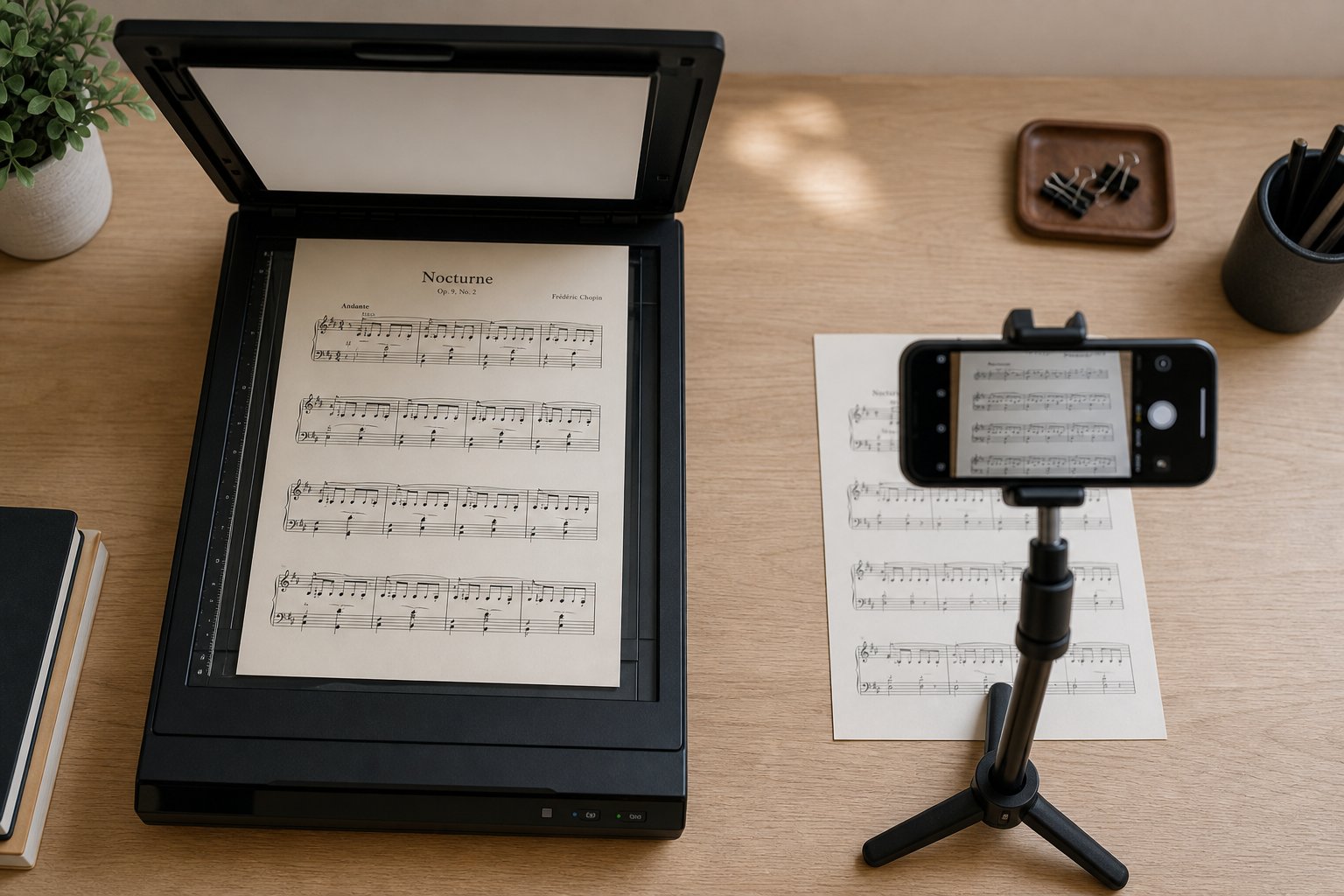
If you are wondering how to efficiently scan documents, it is important to understand that technical settings play a much more important role than the scanning device itself. For example, a smartphone camera with good lighting may produce better results than an expensive flatbed scanner with incorrect settings.
Resolution is the single most important factor. Scan at a resolution of at least 300 DPI: at lower values, thin staff lines and small note heads become blurred, making accurate recognition of musical symbols impossible.
In addition to resolution, the choice of color mode directly affects recognition quality. Chorilo's OMR Documentation recommends using black-and-white or monochrome images for best results—this aligns with the preferences of all specialized OMR tools. Color scans introduce redundant data: AI does not need information about your score being printed on cream-colored paper or highlights made with a yellow marker. Monochrome processing eliminates color noise while maintaining clear contrast between the notation and the background. Pure monochrome (1-bit) color depth works well for modern editions with crisp print quality, but may lose detail on older reproductions where ink has faded and turned gray.
Format also matters. PDF files reliably preserve resolution and page structure when viewed on various devices. JPEG images contain compression artifacts—characteristic distortions in the form of "blocks" or "squares" around high-contrast boundaries—which can hinder symbol recognition. PNG and TIFF formats allow you to preserve original quality without lossy compression. If your scanner allows saving documents as PDFs at 300 DPI or higher, it is best to use this option by default. If you are working with photographs, save them as PNG rather than JPEG whenever possible.
How to properly prepare sheet music for the best results
Different source materials require different processing methods. For example, a freshly printed sheet music score from a modern publisher is recognized by artificial intelligence systems quite differently than a 40-year-old copy or a page scanned from a tightly bound church hymnal.
Here is a pre-work checklist covering the most common scenarios.
- Printed scores (individual sheets): Place the sheet flat on the scanner glass or work surface. Ensure the page lies straight: even a slight skew (of a few degrees) forces the AI to make adjustments, which can lead to errors. The CZUR scanner manual recommends aligning pages with the central markers and removing foreign objects from the scanning area.
- Bound books and hymnals: The main problem here is the shadow in the spine fold (a dark strip caused by the curvature of pages near the binding). Overhead scanners (such as the CZUR ET Max) handle this thanks to curvature correction algorithms, but when using a flatbed scanner, try to flatten the book as much as possible or scan pages individually. Before uploading the file to optical music recognition (OMR) software, crop the image to remove the fold shadow.
- Photocopies: These often have lower contrast compared to originals, lines appear thickened, and note heads are filled with black. Increase contrast in a graphics editor before scanning. If the staff lines look broken or faded, the AI may not recognize them at all.
- Smartphone photos: Shoot strictly from above to avoid perspective distortion. Use natural daylight or quality artificial lighting: shadows on the page create false dark areas that confuse staff line recognition algorithms. Avoid flash, as it creates glare and uneven lighting.
- Old or faded prints: Software-increase contrast before uploading. Some OMR tools have preprocessing features, but using a clean, high-contrast image always yields better results than relying on the program to fix source defects.
- Handwritten scores: Be realistic. As noted by Chorilo, handwritten music is recognized only approximately at best. Non-standard symbol shapes, uneven spacing, and individual abbreviations complicate pattern recognition algorithms. If you must scan handwritten music, be prepared for significant editing of the result—or consider manual entry as a faster alternative.
One often overlooked recommendation in professional workflows for preparing music files: arranger John Hinchey advises cropping images so that only the staff lines are visible when uploading to the site. Remove wide margins, handwritten annotations in the margins, and any elements not related to musical notation. The less visual noise the AI has to filter, the more accurately it recognizes actual musical symbols.
For those learning to scan multi-page sheet music, maximum consistency is important. On each page of a multi-page music edition, use the same scanning settings, lighting, and document position. Inconsistent scanning quality between pages leads to uneven text recognition—and you won't know which specific pages require serious correction until you review the entire scan result.
After the recognition stage, the correction process itself becomes more efficient thanks to a systematic approach. Hinchey's professional checklist The order of error correction follows this priority: first check time and key signatures (as errors in these elements can have consequences throughout the entire score), then key signatures, then rhythm to ensure no measure contains missing beats, then accidentals, and finally—grouping of staff lines and assignment of text labels. This order allows you to identify the most critical errors that could cause serious issues for further processing before starting visual corrections.
Another useful tip: always save your work in the original OMR tool format before exporting. If you open a MusicXML file in a notation editor and discover a systemic error—for example, a missing key change that affected an entire part of the musical piece—it is often faster to return to the scanner, fix the error, and re-export the file than to manually correct dozens of notes in the notation editor.
Thanks to high-quality source material and a strictly structured correction process, the scanning and notation conversion system becomes truly practical for everyday use. And when you have an accurate digital score at your disposal, creative possibilities extend far beyond simple playback.
Turning Scanned Sheet Music into New Creative Ideas
A corrected MIDI file is not the final result, but rather source material. The entire processing chain—from scanning to notation, including source file preparation, note recognition, and error correction—yields something far more valuable than mere playback: editable musical data that can be reworked, rearranged, and used as the foundation for new compositions. For producers, composers, and arrangers, this is where the real value of the entire workflow lies.
Imagine what you can actually achieve after an AI system reads your sheet music and generates a clean MIDI file. Every note, every rhythm, every chord voicing—all of it becomes data that you can freely manipulate. With a single command, you can transpose the music to any key. You can isolate a melodic line and write counterpoint for it. You can strip away excessive ornamentation, leaving only the harmonic foundation, and then rebuild the composition in a completely different style. Printed sheet music was static; MIDI files offer infinite plasticity.
From Scanned Notation to a Creative Starting Point
The most obvious creative application is transposition. For example, you might have scanned a vocal score in E-flat major, but you need a version in G major to suit your singer's timbre. Or perhaps you want to transpose music written for a clarinet (a B-flat instrument) to concert pitch for a flutist. Tools like ScanScore handle this directly within the scanning workflow: recognize the notation, select the target key, and export the transposed version in MIDI or MusicXML format—all without using a DAW.
However, transposition is just the first step. Below are practical workflows that connect sheet music scanning with active music creation and composition:
- Extracting Melodic Lines for Arrangement: Isolate the top voice from a piano score and use it as the basis for an ensemble arrangement. Transferring notes from a piano recording into the Piano Roll of a Digital Audio Workstation (DAW) gives you complete freedom: this melody can be assigned to any instrument.
- Harmonic Analysis and Reharmonization: Load the MIDI file into a chord analyzer to determine the harmonic progression, then experiment with substitutions, extensions, or entirely different voice leading while preserving the original melody.
- Creating Variations and Developing Material: Use the scanned theme as a starting point—invert it, play it in retrograde, break it down into individual motifs, or layer it upon itself at different intervals to discover new compositional ideas.
- Turning Study Sketches into Full-Fledged Songs: Students can use recognized patterns from scanned exercises or etudes as "building blocks" for their own compositions, transforming educational material into creative products.
- Changing Tempo and Character: A scanned waltz can be turned into a swing piece, or a classical theme can become a beat for a lo-fi track. MIDI data has no fixed tempo or groove: you define the rhythmic character that suits your vision.
- Creating Backing Tracks for Practice or Performance: Scan an ensemble score, mute your part, and play along with the other voices rendered by high-quality virtual instruments.
Each of these workflows is built on the same foundation: accurate MIDI data extracted from printed sheet music. The scanning step unpacks the content; what you do afterward determines whether the file remains a simple reference or becomes a starting point for creating something new.
AI-Powered Tools That Work with Your MIDI Output
This is where the creative process becomes truly engaging. Once a scanned sheet music is converted into MIDI format, you are no longer limited to manual editing. An increasing number of artificial intelligence-based tools can process MIDI data and generate new musical ideas—suggesting harmonic progressions, developing melodies, creating additional parts, or forming entirely new variations based on the structural patterns of the source material.
Imagine scanning the sheet music of a classic jazz standard, extracting its melody in MIDI format, and feeding it into an AI system that generates harmonically consistent counterpoints or suggests reharmonization options you hadn't previously considered. Or scan a theme from classical music and use AI to create variations in different musical genres—the same melodic line, but as an electronic piece or a cinematic soundtrack. The Ai Beat visualizer can help you identify rhythmic patterns in the processed data, opening up new possibilities for creating musical rhythms.
Songai's AI-Based MIDI Generator fits perfectly into this workflow. After the AI system reads your sheet music and generates a MIDI file, you can use the AI-powered generation feature to further develop these musical ideas—creating new melodic variations, exploring arrangement possibilities, or generating additional parts based on the harmonic and melodic "DNA" of the original scanned piece. This instrumental feature combines a chord transposer and a melody generator, effectively bridging the gap between digital sheet music and fresh creative results.
More important here is the overall context rather than any single instrumental solution. The pipeline for scanning sheet music into MIDI format is not just about reproducing old music. It transforms static printed sheet music into a dynamic creative field that AI composition tools can expand, transform, and develop in directions inaccessible even to the original composer. Your scanned sheet music becomes not an archival artifact, but a starting point for new creative possibilities.
This shift in perspective—from focusing on preservation to focusing on creation—fundamentally changes how you perceive the entire process. It also raises one final practical question: given all the capabilities and limitations of this technology, how do you choose the most suitable approach for a specific situation?
Make AI-Powered Sheet Music Reading Simple and Convenient for You
The technology really works: artificial intelligence can read sheet music and reproduce music—this has already been proven. However, the very concept of "works" has different meanings depending on who you are and what you need. A student learning to read piano sheet music has different requirements than a producer looking for melodic materials in a jazz fake book. The right approach depends entirely on your goal, the source material, and the time you are willing to spend on adjustments.
Choosing the Right Method Based on Your Needs
Instead of searching for the single "best" tool, adapt your workflow to specific conditions.
If you need to quickly play back cleanly printed sheet music—such as a single instrument part, a hymn, a lead sheet (melody with chords), or simple piano sheet music with letter notation—modern specialized Optical Music Recognition (OMR) tools handle this excellently. Programs like Soundslice or PlayScore 2 will convert a PDF file into audio in less than a minute, with minimal errors. You won't need expensive software or deep technical knowledge: just scan, listen, and practice.
If the task involves digitizing complex scores—orchestral parts, dense polyphonic piano pieces, or old editions with faded fonts—be prepared for the need for manual correction. Tools like Newzik and Soundslice provide a solid foundation, but recognizing piano notes with multiple voices, note grouping across staves, and implied special rhythmic divisions (such as triplets) still poses challenges for all programs currently on the market. Allow time to check and edit the results in your chosen sheet music editor.
If you want to use recognized notes as a source of creative inspiration — for example, to create arrangements based on scanned melodies, generate variations, or compose new pieces based on existing harmonic progressions — then the MIDI format provides a direct link to AI tools for music composition and arrangement. Songai's AI-based MIDI Generator fits perfectly into this process: it allows you to take scanned MIDI data and develop it into new melodic ideas, arrangements, and musical material, eliminating the need to start from a blank slate.
The principle of choice is simple: it all depends on the result you need. Basic accuracy is sufficient for simple playback. High accuracy and quality export to MusicXML format are necessary for obtaining an editable score. Creative work requires accurate MIDI data and tools for further processing capable of expanding and transforming the material obtained through scanning.
The Future of Artificial Intelligence and Sheet Music
This field is developing rapidly. Machine learning-based Optical Music Recognition (OMR) systems have improved significantly even compared to what was available just a few years ago: recent testing conducted by Scoring Notes showed that tools like Soundslice produce results for individual instrument parts that require practically no manual editing — something that seemed unthinkable ten years ago. New research combining visual recognition and sequence analysis methods is increasing the accuracy of processing complex scores, while end-to-end neural network methods are becoming increasingly reliable in handling handwritten sheet music.
For those looking for ways to work more efficiently with sheet music — whether it’s playing back a score, digitizing a personal library, or converting printed sheet music into a ready-to-use MIDI file — modern tools offer truly practical solutions. They are not perfect and require high-quality source materials and realistic expectations. However, in most typical use cases, the gap between the state of "almost useless" and a level that allows for significant time savings has already been bridged.
Reading sheet music from digital sheets no longer depends on whether the system works in principle — now it is about choosing the right tool for a specific type of sheet music, properly preparing the source material, and understanding when the result requires manual adjustment and when it is ready for use or can serve as a starting point for creating something entirely new.
The entire workflow — from scanning a musical score to recognition, conversion to MIDI format, playback, or creative processing — is available to anyone with a smartphone with a camera and an internet connection. Regardless of your goal — studying music theory or learning to read music by ear, preparing demo tracks for a musical ensemble, or feeding scanned musical themes into AI tools like Songai's AI-based MIDI Generator today, when searching for fresh compositional ideas, the path from printed text to musical idea has never been shorter.